
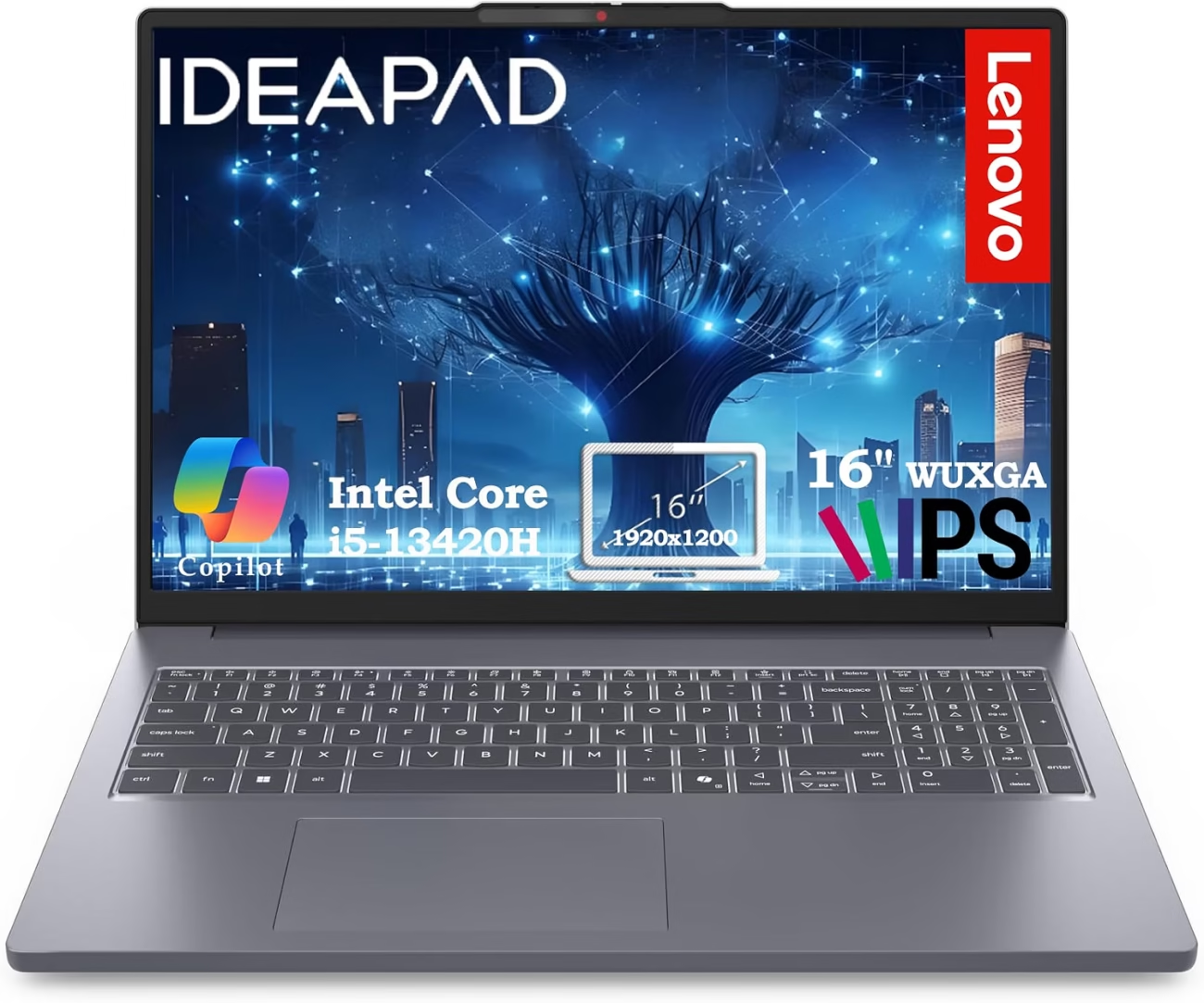
Lenovo Business Laptop Review: 16GB RAM, 512GB SSD & Intel Core i5-13420H for Work and Productivity

The Lenovo Business Laptop with Intel Core i5-13420H, 16GB RAM and 512GB SSD is aimed at users who need a practical Windows laptop for work, study, remote working and everyday productivity. Its combination of an H-series Intel Core processor, generous memory and fast PCIe SSD storage gives it a stronger performance-oriented configuration than many entry-level office laptops.
The configuration is associated with Lenovo’s 16-inch IdeaPad Slim 3 family. Lenovo’s specification documentation lists the Intel Core i5-13420H among the available processors for the 16-inch platform, along with configurations offering up to 16GB memory and PCIe SSD storage.
For everyday users, the biggest attraction is the balance between processing power, a large 16-inch 16:10 display, 16GB memory and 512GB solid-state storage. This combination is particularly useful for Microsoft Office work, spreadsheets, browsing, video meetings, online learning and general multitasking.
Intel Core i5-13420H Processor
At the center of this configuration is the 13th-generation Intel Core i5-13420H. It is an H-series processor designed for higher-performance laptop configurations rather than ultra-low-power entry-level systems.
The processor has 8 cores and 12 threads and can reach up to 4.6GHz according to the current product information associated with this configuration.
That makes it well suited to workloads that involve several applications running at the same time. For example, a user can work in Word or Excel while keeping numerous browser tabs open and participating in a video conference.
The H-series processor is also useful for heavier productivity applications than basic Celeron, N-series or entry-level processors. It can handle office productivity, web applications, programming, light content creation and other demanding everyday tasks without being positioned as a dedicated workstation.
16GB RAM for Multitasking
The included 16GB of RAM is one of the most important advantages of this configuration.
Modern Windows systems, web browsers and productivity applications can consume considerable memory when used simultaneously. With 16GB available, the laptop is better suited to keeping multiple applications open at the same time than many 8GB configurations.
This is particularly useful for professionals who regularly switch between:
- Microsoft Word and Excel
- Multiple browser tabs
- Email applications
- Microsoft Teams or Zoom
- Cloud storage applications
- PDF documents
- Business software
- Online research tools
- Light photo-editing applications
- School and university software
Lenovo’s platform documentation confirms that the IdeaPad Slim 3 16 family supports configurations with up to 16GB memory.
512GB PCIe SSD Storage
The laptop also includes a 512GB PCIe SSD. Solid-state storage is a major improvement over traditional mechanical hard drives because there are no moving parts and everyday operations can feel significantly more responsive.
The 512GB capacity provides useful space for business documents, presentations, spreadsheets, applications, photographs and other personal files.
It also leaves more usable room than the increasingly common 128GB or 256GB entry-level configurations. For a work laptop, 512GB is a practical middle ground between capacity and cost.
Lenovo’s official specifications for the matching IdeaPad Slim 3 16 platform list PCIe M.2 SSD configurations including 512GB.
16-Inch WUXGA IPS Display
The larger 16-inch display is another reason this laptop makes sense for productivity.
The matching Lenovo platform uses a 1920 × 1200 WUXGA IPS display with a 16:10 aspect ratio. Lenovo lists the panel at 300 nits with 45% NTSC color coverage on the relevant configuration family.
The 16:10 aspect ratio provides additional vertical space compared with a conventional 16:9 Full HD screen. That extra vertical area can be particularly helpful for spreadsheets, long documents, web pages and coding interfaces because more content can be visible without scrolling.
The IPS technology also provides viewing angles that are generally more suitable for shared viewing than basic TN panels.
Why the 16:10 Screen Is Useful for Business
A laptop screen is not just about diagonal size. The aspect ratio has a noticeable effect on productivity.
With 1920 × 1200 resolution, the screen has 120 additional vertical pixels compared with a standard 1920 × 1080 display. That makes the format especially appropriate for office work.
For example, someone working on an Excel spreadsheet can see more rows at once, while someone writing a long document can see more of the page without constantly scrolling.
The larger display can also make split-screen work more comfortable when comparing documents or keeping a browser window alongside an office application.
Anti-Glare Productivity Display
The available configuration is described with an anti-glare IPS display. This is a useful characteristic for an office-oriented laptop because it can reduce distracting reflections from windows and overhead lighting.
The listed 300-nit brightness is suitable for typical indoor office, classroom and home environments. However, users who frequently work outdoors or in very bright direct sunlight may want a laptop with a significantly brighter panel.
Integrated Intel Graphics
This configuration relies on integrated Intel graphics rather than a dedicated NVIDIA or AMD graphics processor. Lenovo’s platform documentation identifies integrated/UMA graphics for the i5-13420H configuration.
That is appropriate for everyday productivity, streaming video, web applications, presentations and many lighter creative workloads.
It is not, however, a dedicated gaming or professional graphics workstation. Users who need demanding 3D rendering, advanced video production, CAD workloads or modern AAA gaming at high settings should consider a laptop with a dedicated GPU.
Keyboard with Numeric Keypad
The full-size keyboard configuration is particularly useful for business users who work with numbers. The included numeric keypad can make spreadsheet entry, accounting, invoicing and inventory management more convenient.
This is one of those practical features that can matter more during daily work than a specification that looks impressive on a product page.
A backlit keyboard is also associated with some versions of this configuration, but buyers should verify the exact Amazon configuration before ordering because Lenovo laptop specifications can vary between regional and seller-specific versions.
Webcam and Privacy Shutter
For remote workers and students, the built-in webcam provides a convenient way to participate in video meetings without an external camera.
The associated specification lists an HD 720p webcam with a privacy shutter.
The privacy shutter is a useful physical feature because it allows the camera lens to be covered when the webcam is not being used. This is especially relevant for people who frequently work remotely or share a laptop with other members of a household.
The webcam is suitable for ordinary meetings and online classes, although users who require studio-quality video for professional presentations may still prefer an external webcam.
Wi-Fi 6 Connectivity
The configuration is listed with Wi-Fi 6, providing modern wireless connectivity for compatible routers. This is useful for video meetings, cloud applications, streaming and transferring files over a local network.
Bluetooth connectivity is also available for compatible wireless accessories such as mice, keyboards, headphones and speakers.
Wireless performance will naturally depend on the router, network conditions, distance and surrounding interference rather than the laptop alone.
Useful Selection of Ports
The laptop offers a practical selection of physical connections for office and home use. The associated configuration includes:
- 2 × USB-A ports
- 1 × USB-C port
- HDMI output
- SD card reader
- 3.5mm audio/headphone jack
- Power connection
Lenovo’s platform documentation confirms USB-C, USB-A, HDMI and SD-card connectivity on the 16-inch IdeaPad Slim 3 family.
The USB-C port is particularly useful because the platform documentation identifies it as a full-function port supporting data, DisplayPort and power delivery on the relevant configuration family.
Good Choice for Office Work
The hardware combination makes this Lenovo particularly suitable for standard office applications.
Microsoft Word, Excel, PowerPoint, web-based business applications, email, PDF documents and video conferencing are all natural workloads for this type of configuration.
The 16GB memory is especially helpful when several of these applications are used simultaneously. The 16-inch 16:10 screen also provides more comfortable working space than many compact 14-inch notebooks.
Suitable for Students and Remote Workers
The same characteristics that make the laptop useful for business also benefit students and remote workers.
The larger screen provides a comfortable workspace for research and writing, while the 16GB RAM and Core i5 H-series processor provide enough headroom for multitasking.
The privacy shutter can also be useful for online classes and video calls, while Wi-Fi 6 supports modern home networks.
Light Creative Work
The Core i5-13420H and 16GB memory give this laptop enough performance for many lighter creative tasks. Basic photo editing, simple graphic work, short-form video editing and content management are reasonable use cases.
However, the integrated graphics should be kept in mind. This is not intended to replace a workstation or creator laptop with a dedicated graphics card.
For occasional editing, social-media content and basic creative projects, the configuration can be practical. For professional 4K video production, 3D rendering or advanced visual effects, a dedicated-GPU system would be more appropriate.
Portability and 16-Inch Design
Despite its larger display, the matching IdeaPad Slim 3 16 platform starts at around 1.74 kg / 3.84 pounds and measures approximately 359.2 × 257 × 17.9 mm.
That is reasonably portable for a 16-inch laptop, although it is still larger than a typical 13- or 14-inch ultrabook.
For users who mainly travel between home and office, the larger screen can be worth the additional size. For frequent travelers who spend a lot of time carrying their laptop through airports, trains or meetings, a smaller notebook may be easier to handle.
Battery and Charging
Battery capacity and battery life can vary according to the exact configuration. Lenovo’s documentation for the related 16-inch platform lists a 47Wh battery and Rapid Charge Boost, with the manufacturer noting that actual battery life depends heavily on configuration, brightness, software, wireless activity and other factors.
This is important because an H-series processor is designed for stronger performance than many ultra-low-power laptop chips. Buyers should therefore avoid assuming that every configuration will deliver all-day battery life under demanding workloads.
For office work, web browsing and moderate usage, battery life can be reasonable, but heavy multitasking, video calls, high screen brightness and demanding applications will consume more power.
Windows 11
The matching Lenovo platform supports Windows 11, with Lenovo documentation indicating Home and Pro configurations depending on the specific model.
The exact Amazon configuration should therefore be checked before purchase if Windows 11 Pro is important for your business.
Windows 11 provides the familiar desktop environment required for Microsoft Office, browser-based productivity applications, video-conferencing software and a wide range of professional tools.
Build and Everyday Practicality
The IdeaPad Slim 3 family is positioned as a practical mainstream laptop rather than Lenovo’s premium ThinkPad business line. That distinction is worth remembering.
The configuration focuses on useful specifications—large display, strong processor, 16GB RAM, SSD storage and practical connectivity—rather than premium materials or workstation-class business management features.
For individual professionals, students, freelancers and home-office users, that can be a sensible approach because the hardware is focused on the tasks most people actually perform every day.
What Can You Do With This Lenovo?
- Microsoft Word, Excel and PowerPoint
- Web browsing with many tabs
- Email and cloud applications
- Microsoft Teams and Zoom meetings
- Online learning and research
- Accounting and spreadsheet work
- Programming and development
- Light photo editing
- Basic video editing
- Streaming movies and music
- Social-media management
- General home and business computing
Pros
- Intel Core i5-13420H: An 8-core/12-thread H-series processor suited to demanding everyday productivity.
- 16GB RAM: Provides comfortable multitasking for modern Windows workloads.
- 512GB PCIe SSD: Good balance of speed and storage capacity.
- Large 16-inch display: Provides more workspace than smaller notebooks.
- 16:10 WUXGA resolution: Useful extra vertical space for documents and spreadsheets.
- IPS panel: Provides broad viewing angles for everyday use.
- Numeric keypad: Particularly useful for accounting, finance and data entry.
- Privacy shutter: Adds a simple physical layer of webcam privacy.
- Modern connectivity: USB-C, USB-A, HDMI, SD card and audio connections are practical for office use.
- Wi-Fi 6: Supports modern wireless networking.
Things to Consider Before Buying
- Integrated graphics: Not designed for demanding gaming or professional 3D workloads.
- 16-inch footprint: More portable than many large laptops but still less compact than a 14-inch model.
- Display color coverage: The relevant Lenovo specification lists 45% NTSC, so this is primarily a productivity display rather than a professional color-critical panel.
- Battery life varies: The H-series processor and workload can have a noticeable effect on runtime.
- Configuration differences: Lenovo sells multiple versions of the IdeaPad Slim 3 16 family, so buyers should verify the exact Amazon configuration for operating system, display, keyboard, battery and ports.
Who Is This Lenovo Laptop Best For?
This configuration is a strong match for business users, students, freelancers, remote workers and home-office users who want more performance and screen space than a basic entry-level laptop provides.
It is particularly attractive for people who spend much of their working day in spreadsheets, documents, browser applications and video meetings. The combination of 16GB RAM and an i5 H-series processor provides useful headroom for multitasking.
The numeric keypad is also a practical advantage for accountants, administrators, finance workers and anyone who regularly enters numbers.
Who Should Consider a Different Laptop?
Gamers and professional creators should consider a system with dedicated graphics. The integrated graphics are designed for everyday computing rather than demanding 3D workloads.
Users who prioritize premium materials, advanced enterprise security, docking features or corporate IT management may also prefer a ThinkPad or another dedicated business-class model.
Finally, frequent travelers who prioritize minimum weight may prefer a smaller 13- or 14-inch laptop.
Final Verdict
The Lenovo Business Laptop with Intel Core i5-13420H, 16GB RAM and 512GB SSD is a productivity-focused configuration that puts its hardware budget in useful places.
The 8-core/12-thread Core i5-13420H provides substantial everyday processing capability, while 16GB RAM makes multitasking much more comfortable. The 512GB PCIe SSD adds fast storage and enough capacity for typical business and personal files.
The 16-inch WUXGA IPS display is another major advantage. Its 16:10 aspect ratio gives spreadsheets, documents and websites additional vertical room, making it particularly well suited to office work.
The main limitations are equally clear: integrated graphics are not intended for demanding gaming or professional 3D work, the display is designed primarily for productivity rather than professional color grading, and battery life will depend heavily on workload.
Overall, this Lenovo configuration is a practical choice for users who want a large-screen Windows laptop with strong multitasking performance, generous memory and fast SSD storage for business, study and everyday productivity.
Rating: 4.7/5
Performance: 4.8/5
Multitasking: 4.8/5
Display: 4.6/5
Storage: 4.8/5
Connectivity: 4.7/5
Portability: 4.5/5
Overall: 4.7/5
Check the Current Price and Availability
If you are looking for a Lenovo laptop with an Intel Core i5 H-series processor, 16GB RAM, 512GB SSD and a spacious 16-inch display, this configuration is worth considering for business and productivity use. Before ordering, verify the exact Amazon variant, especially the operating system, display configuration, keyboard features and warranty terms.

Product: Lenovo Business Laptop
Processor: Intel Core i5-13420H
CPU: 8 cores / 12 threads
Memory: 16GB RAM
Storage: 512GB PCIe SSD
Display: 16-inch WUXGA IPS
Resolution: 1920 × 1200
Aspect Ratio: 16:10
Graphics: Intel Integrated Graphics
Connectivity: Wi-Fi 6, Bluetooth, USB-C, USB-A, HDMI, SD card reader
Best For: Business, office work, study, remote work and multitasking
Tags: Lenovo business laptop, Lenovo laptop i5-13420H, Lenovo 16 inch laptop, Lenovo IdeaPad Slim 3, 16GB RAM laptop, 512GB SSD laptop, Intel Core i5 laptop, business laptop, work laptop, office laptop, laptop for students, laptop for remote work, Windows 11 laptop, Lenovo productivity laptop, Lenovo laptop review
